Lead generation pages

Landing Page Builder for Lead Generation

Create landing pages that turn a visit into a lead. The page you publish is a headline, supporting text, and the qualification questions, on a hosted link or an embed. A connected AI client can draft it. This is not a drag-and-drop website builder.

14-day free trial · Card required · Then $49.99/mo · Cancel anytime

Hosted page preview

Sample financing page

Find Financing Options for Your Business

Answer a few questions about your business and financing needs.

  • The amount you want to discuss
  • How long the business has been operating
  • A way for someone to reply
Check Your Options
A preview of the hosted lead page: headline, supporting line, and the button into the questions. It is not a screenshot of a drag-and-drop editor, and it is not a loan offer.

See What You Can Build With MCP LeadFlow

Open the sample financing page, switch between desktop and mobile, and answer the questions. “Less than 6 months” adds one extra question. Nothing you click is saved.

Sample hosted page · not a loan offer · nothing is saved

Sample financing page

Find Financing Options for Your Business

Answer a few questions about your business and financing needs.

  • The amount you want to discuss
  • How long the business has been operating
  • A way for someone to reply

The footer on a live page can hold a disclaimer plus privacy and terms links. This sample does not invent customer quotes.
What Is a Landing Page Builder?

A landing page builder helps you publish one page for one action: a quote, an inquiry, a registration, or a short qualification. A website is a collection of pages. A funnel is the sequence that captures or qualifies someone. In MCP LeadFlow the landing page and that sequence are published together.

  1. Advertising trafficAn ad or a partner link
  2. Landing pageHeadline and the offer
  3. QualificationQuestions on that same page
  4. Lead submissionContact details stored

Traffic buying stays outside the product. The questions themselves are covered on the funnel builder page. A one-question quiz version is on the quiz funnel builder page.

How to Create a Lead Generation Landing Page

Four decisions. The building happens in the visual editor, or from a connected AI client that writes the draft.

  1. 1

    Define the offer

    Name the one action: a funding inquiry, an insurance quote request, a roofing estimate, or a real estate conversation. The page exists for that action.

  2. 2

    Create the page

    Set the headline, the supporting line, an optional banner, header, footer, colors, and type. The questions sit on that page. There is no drag-and-drop canvas for extra sections.

  3. 3

    Connect the questions

    Add the facts you need before a reply. An answer can open a follow-up or skip ahead. Contact details can wait until the end.

  4. 4

    Publish and read the result

    Preview the path in the builder. Publish a hosted link, or embed the page on a site you already have. Drop-off and submissions show where people leave. Nothing republishes itself.

Build Landing Pages With AI

You connect an MCP client, then describe the page. Claude and Cursor are the clients this product is set up for. There is no chatbot on this website. How the connection works is on the AI funnel builder page.

Instruction

Create a landing page for a roofing company offering free roof inspections. Include a clear headline, service benefits, and a lead qualification funnel that asks about property type, roofing issue, and ZIP code.

What that instruction maps to

  1. Headline on the hosted page
  2. Supporting text for the inspection offer
  3. Property type, then the roofing issue
  4. ZIP code and contact details

You send the instruction from your AI client. This card does not call a model, and it does not produce a freeform page of extra sections.

Page and questions

Book a Free Roof Inspection

  • Property type
  • What is going on with the roof?
  • ZIP code
  • Contact details
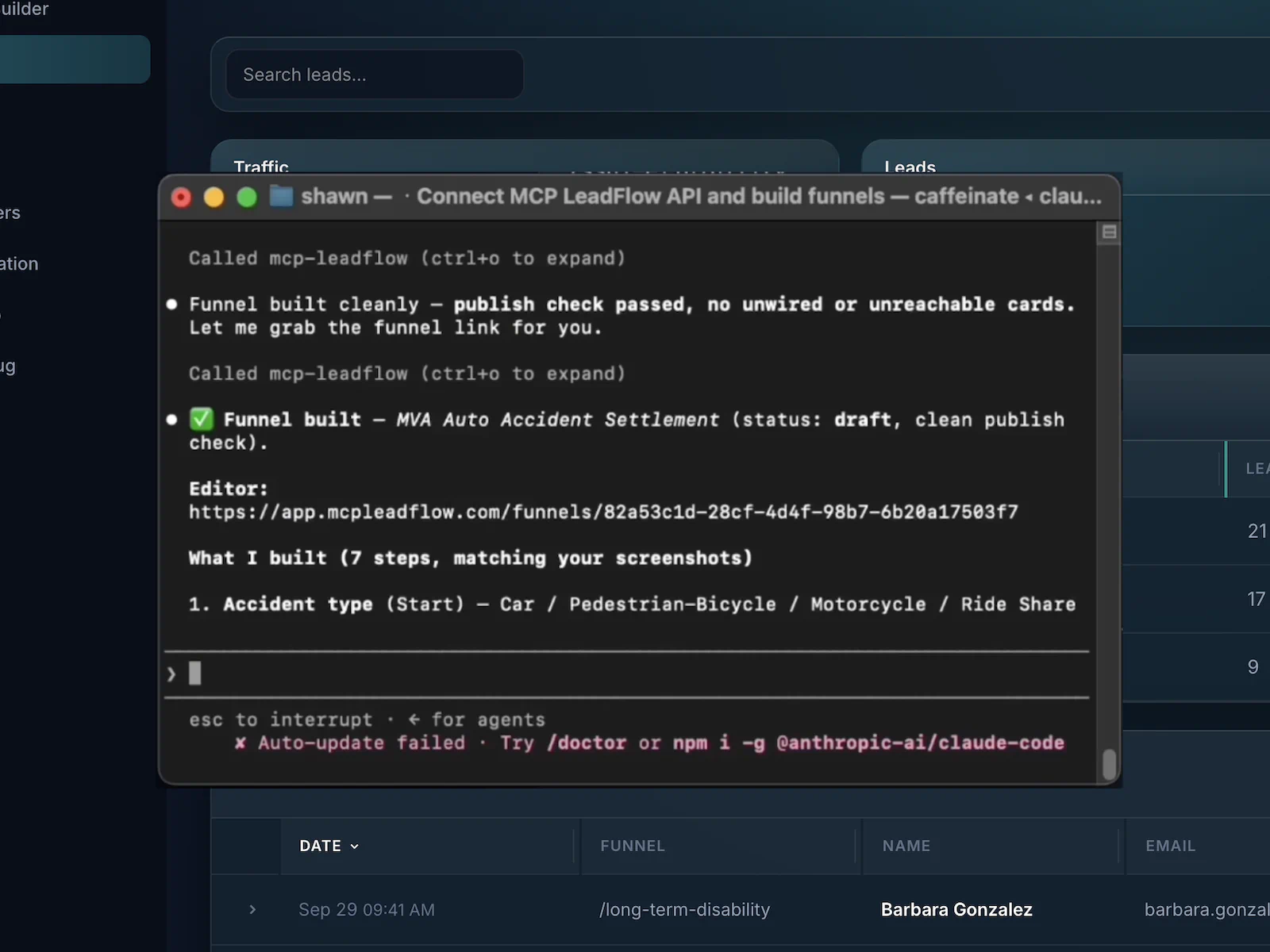
Claude connected to MCP LeadFlow while a funnel is created from a prompt
A real view of creating a funnel from Claude. The roofing headline above is the example for this page, not a claim that this screenshot is that page.

Build Landing Pages That Capture Leads

These are the parts the product includes. It does not offer drag-and-drop sections, custom-domain hosting, A/B tests, heatmaps, a CRM, email sequences, or checkout.

A hosted lead page

Publish a focused page with a headline, supporting text, an optional banner, a header, and a footer. The questions are part of that page.

Lead capture on the page

Collect name, email, and phone on the same experience. Submissions stay in the workspace and can be posted onward with a webhook or API.

Multi-step qualification

Ask amount, then time in business, then contact details, instead of one crowded form under the headline.

Conditional questions

A newer business can see one extra question. Other visitors skip it. The sample below does that.

AI-assisted drafts

A connected client can draft the headline, the page text, and the questions. You still connect Claude, Cursor, or another MCP client first.

A page that fits a phone

The published page reflows. Answer buttons stay tappable. You do not build a separate mobile page.

Hosted link or embed

Share the hosted link, or place the embed on WordPress, Webflow, or any page that accepts HTML. Your own domain is not attached to the hosted link.

Funnel analytics

See where people leave the questions, how many leads arrive, and which runs convert. This is not a heatmap or a website traffic suite.

Text, color, and footer

Change the headline, colors, type, progress bar, button shape, logo, banner, and footer links. There is no theme marketplace and no photo library.

Landing Page Examples for Lead Generation

Four campaign pages. Each one is an illustration of a headline plus the first question. None of them is a template you can open.

Business financing

Find Financing Options for Your Business

How much funding does your business need?

Goal. An inquiry a reviewer can open before an application.

Path. Headline, amount, time in business, contact.

Roofing quote

Book a Free Roof Inspection

What is going on with the roof?

Goal. An estimate request that already names the job.

Path. Headline, issue, property, ZIP, contact.

Insurance quote

Tell Us What Coverage You Are Exploring

Who needs coverage?

Goal. A coverage inquiry, not a plan recommendation.

Path. Headline, who is covered, coverage type, contact.

Real estate

Tell Us Whether You Are Buying or Selling

Are you buying or selling?

Goal. A buyer or seller inquiry before the appointment.

Path. Headline, intent, timeline, contact.

Connect Your Landing Page to a Lead Generation Funnel

A short contact form asks for a name and an email. A lead page can ask what the person wants first, then collect contact details. In MCP LeadFlow those questions are the page, not a widget you drop into a separate design. Different campaigns need different questions. A roofing click should not see a funding-amount question.

  1. Landing page
  2. Questions
  3. Qualification
  4. Contact details
  5. Lead stored

Multi-step questions are useful when the next question depends on the last answer. They are not automatically better than a short form. When the goal is a sales conversation, see the sales funnel builder. When the page exists to collect the lead, see the lead capture landing page.

Landing Page Templates for Different Campaigns

There is no public template library, and no template URL to open. The structures below are briefs. Inside the product you can duplicate a funnel or save a workspace template for the next campaign.

Business financing

Audience. Someone who clicked an ad for this offer.

Conversion. An inquiry a reviewer can open before an application.

You can change. The headline, the question wording, colors, and the footer.

Roofing quote

Audience. Someone who clicked an ad for this offer.

Conversion. An estimate request that already names the job.

You can change. The headline, the question wording, colors, and the footer.

Insurance quote

Audience. Someone who clicked an ad for this offer.

Conversion. A coverage inquiry, not a plan recommendation.

You can change. The headline, the question wording, colors, and the footer.

Real estate

Audience. Someone who clicked an ad for this offer.

Conversion. A buyer or seller inquiry before the appointment.

You can change. The headline, the question wording, colors, and the footer.

What Makes a Good Lead Generation Landing Page?

Practical checks for a page with one offer. These are not conversion benchmarks.

Several jobs at once

  • About us
  • Blog
  • Shop
  • Book a call
  • Download a guide
  • Follow us

One offer

Book a Free Roof Inspection

Property, the problem, and a ZIP. Then a way to reply.

Check Your Roof

  1. 1

    Say the offer in the headline

    “Book a free roof inspection” is a page. “Welcome to our company” is not.

  2. 2

    Keep one action

    One button into the questions. Extra offers belong on a different page.

  3. 3

    State what they get

    A short line under the headline can say which facts you will ask for.

  4. 4

    Make the button match the offer

    “Check your options” fits a financing page. “Submit” fits a form with no context.

  5. 5

    Ask only what the next person needs

    Amount and time in business, not a biography.

  6. 6

    Check it on a phone

    The headline and the first question should be readable without a pinch-zoom.

  7. 7

    Do not front-load the contact fields

    A long form under the headline asks for trust before the visitor knows the offer. Move contact details later when the questions are doing the work.

  8. 8

    Read who leaves, then edit

    If people stop on one question, shorten it or move it. Publish again.

Traditional Landing Page Building vs. AI-Assisted Workflows

Both paths end in the same hosted page. The agent saves typing. It does not add a section builder, and it is not faster than every other product on the market.

Editing the page yourself compared with drafting it through a connected agent
WorkIn the builderWith a connected agent
First draftWrite the headline and each question yourself.Describe the offer. A connected agent drafts the headline, the text, and the questions.
Page sectionsYou set the banner, header, headline, and footer in the design fields.You can ask for those fields in the same instruction. There is still no freeform section canvas.
QuestionsAdd each step and its answers in the builder.The agent drafts the sequence. You review the wording.
BranchesPoint each answer at the next step.Say which answer should open an extra question.
Later editsChange the headline or a question in the builder and publish again.Send a follow-up, such as “Only ask about revenue when the business is under six months old.”
SetupAn account is enough to edit in the builder.Natural-language drafts wait until you connect your own AI client. That subscription is separate.

Understand How Your Landing Pages Generate Leads

The useful question is where people leave the questions, and how many leads arrive. MCP LeadFlow records drop-off, submissions, and conversions. It does not record a heatmap, and it does not tune the page for you. Ad pixels, if you add them, report the visit in the ad platform.

Illustrative drop-off · not live data

Invented counts for the financing sample. These numbers are not from a customer account.

  • Opened the page100 started
  • Funding amount81 continued
  • Time in business70 continued
  • Contact details46 submitted

What you might change

People leave on the amount question. Offer ranges as buttons, and move ZIP after contact details.

You make that edit in the builder, or you tell your connected client, then you publish again.

Landing Pages for Businesses That Generate Leads

A fit is a team that needs one page per offer, not a corporate site. Plans start at $49.99 a month after the trial. See pricing.

Performance marketers

Match the headline to the ad, then ask the questions the offer requires before anyone is paid for the lead.

Affiliate marketers

Put the qualification on the hosted link you send traffic to. A webhook can pass the submission on. The offer page after that is yours.

Agencies

Give each client a page for one offer. Duplicate it when the next client needs the same shape with different wording.

Insurance advertisers

A headline about the coverage they clicked, then who is covered and which type. The page does not recommend a plan.

Home services

“Book a free roof inspection” as the headline, then the job, the property, and a ZIP, so the callback is not a cold start.

Mortgage and financing

Separate a purchase from a refinance, or ask for an amount and time in business, before a reviewer opens a file. The page does not approve a loan.

Real estate

The headline asks whether they are buying or selling, so the inquiry already names the appointment.

Lead generation companies

One hosted page per campaign, with the questions a buyer expects, instead of a generic contact form for every offer.

Frequently Asked Questions About Landing Page Builders

Including custom domains and drag-and-drop editing, which this product does not do.

Software for a page aimed at one action, such as a quote request or an inquiry. In MCP LeadFlow that page is the published funnel: a headline, supporting text, and the questions, on a hosted link or an embed. It is not a builder for a multi-page website.

Decide the offer, write the headline and the questions, and set colors, type, and the footer. Preview the path in the builder, then publish a hosted link or an embed. A connected AI client can draft that from a description.

Yes. You describe the page or edit it in the visual builder. You do not write the layout as code.

A connected MCP client such as Claude or Cursor can draft the headline, the supporting text, the colors, and the questions. This website does not include that chat. The agent does not lay out a freeform page of arbitrary sections.

Yes. The questions are the form. You can ask one thing at a time, or put several fields on one step. Submissions stay in the workspace.

The hosted page and the qualification are the same published funnel. You can also embed that funnel on a page you built in another tool, such as WordPress or Webflow.

Yes. Publish when you are ready. You get a hosted link, and you can place an embed on a site you already have. Nothing publishes until you ask.

You get a hosted link, and you can embed the page on a domain you already control. Attaching your own domain to that hosted link is not a setting in the builder.

Yes. Send the ad to the hosted link, or to a page where the funnel is embedded. You can add common tracking pixels in the funnel’s site scripts. MCP LeadFlow does not buy or manage the ads.

Yes. The published page reflows on a phone. The sample on this page includes a phone preview of the same layout.

You can see where people leave the questions, how many leads are submitted, and which runs convert. That is funnel measurement, not a heatmap or a full website analytics suite. Pixels can send events to the ad platform you already use.

A landing page is the focused page someone lands on. A funnel is the sequence that captures or qualifies them. In MCP LeadFlow those are one published experience: the headline and the questions ship together. You can still embed that experience on a broader website.

Yes. Connect MCP LeadFlow in Claude and describe the page and the questions. Claude is not embedded on this website.

There is no public template library on this site. Inside the product you can duplicate a funnel or save a workspace template. The examples on this page are illustrations, not pages you can open.

Those products are built around designing campaign pages. MCP LeadFlow publishes a lead page whose main job is the qualification: a headline, supporting text, and the questions, drafted with a connected AI client. It does not include a drag-and-drop section canvas, A/B testing, or custom-domain hosting. Other products may have AI of their own. This is a difference in what the page is for.

Create Your Next Lead Generation Landing Page

Build a focused page, connect the qualification questions, and capture the details your team needs. You can draft it with a connected AI client, or write it in the editor.

14-day free trial · Card required · Then $49.99/mo · Cancel anytime