Claude, Cursor, and other MCP clients

AI Funnel Builder – Create Complete Funnels With AI

Describe the funnel you want. A connected AI agent generates the questions, answers, and conditional logic inside MCP LeadFlow. Follow up in plain language, then publish the funnel on your website.

14-day free trial · Card required · Then $49.99/mo · Cancel anytime

Instruction to your AI agent

Create a health insurance lead generation funnel. Ask about coverage type, household size, current insurance status, ZIP code, and contact information. Use conditional questions when appropriate.

You type this in Claude, Cursor, or another MCP client — not in a chat box on this page. MCP (Model Context Protocol) is the connection that lets that agent create the funnel in your MCP LeadFlow workspace.

Funnel the agent creates

  1. 1
    Coverage typeIndividual or family, Medicare, or short-term
  2. 2
    Household sizeJust me, spouse, or family
  3. 3
    Current insuranceConditional — Medicare asks about enrollment first
  4. 4
    ZIP codeLocation before contact details
  5. 5
    Contact detailsName, email, and phone on a live funnel

Draft ready for review · unpublished until you say so

Illustrative walkthrough of an instruction and the funnel it maps to. It does not call an AI model, and it is not a screenshot of a specific AI client.

Describe Your Funnel. Let AI Build It.

Your agent turns a short brief into a funnel structure: questions, answer options, and branches you can still change. These three briefs are examples. The walkthrough below uses the same structures and does not contact a model.

Insurance quote

Build an insurance quote funnel with questions for coverage type, household size, and ZIP code.

What gets drafted

  1. What type of coverage are you looking for?
  2. Are you already enrolled in Medicare?Only if coverage is Medicare
  3. How many people need coverage?
  4. What is your ZIP code?
  5. Contact details are the last step

The agent drafts those three questions, then contact details. A Medicare answer can open one extra enrollment question; other coverage types skip it.

Walk through this example
Roofing lead

Create a roofing lead generation funnel that qualifies homeowners based on the type of repair and property location.

What gets drafted

  1. What kind of roofing work do you need?
  2. Is the leak happening right now?Only if the job is an active leak
  3. What kind of property is it?
  4. What is the property ZIP code?
  5. Contact details are the last step

The agent drafts repair type, property type, and ZIP. An active leak can add an urgency question. Replacement and inspection skip it.

Walk through this example

Business loan qualification

Build a business loan qualification funnel that asks about monthly revenue, time in business, and requested funding.

What gets drafted

  1. What is your approximate monthly revenue?
  2. How long have you been in business?
  3. Newer businesses may see different funding options.Only if time in business is under 6 months
  4. How much funding are you requesting?
  5. Contact details are the last step

The agent drafts revenue, time in business, and funding amount. A business under six months old can see an extra note before the funding question.

Walk through this example

How to Build a Funnel With AI

MCP LeadFlow does not include an automatic agent on the website. You connect a client, describe the funnel, revise it, then publish. The broader product — forms, embeds, routing, and analytics — is covered on the funnel builder page. A page built to collect the lead is the AI lead capture page builder.

  1. Connect your AI agent

    Create an MCP LeadFlow account, then add MCP LeadFlow in an MCP-compatible client. Claude and Cursor are the clients the product is set up for. ChatGPT works only when that ChatGPT app can connect to an MCP server. The agent is not built into this website.

  2. Describe your funnel

    Tell the agent who the funnel is for and which questions matter. It creates the steps, answer options, and the path between them in your workspace.

  3. Customize with AI

    Follow up in the same conversation. Supported edits include “Add a question about homeownership,” “Only show the second qualification question if the visitor selects Yes,” and “Move contact information to the final step.” You can also change the draft in the visual builder.

  4. Deploy and improve

    Publish when you are ready, then embed the funnel or share the hosted link. Review drop-off, submissions, and conversions in MCP LeadFlow, and ask the agent to edit the flow. It does not republish or rewrite a live funnel on its own.

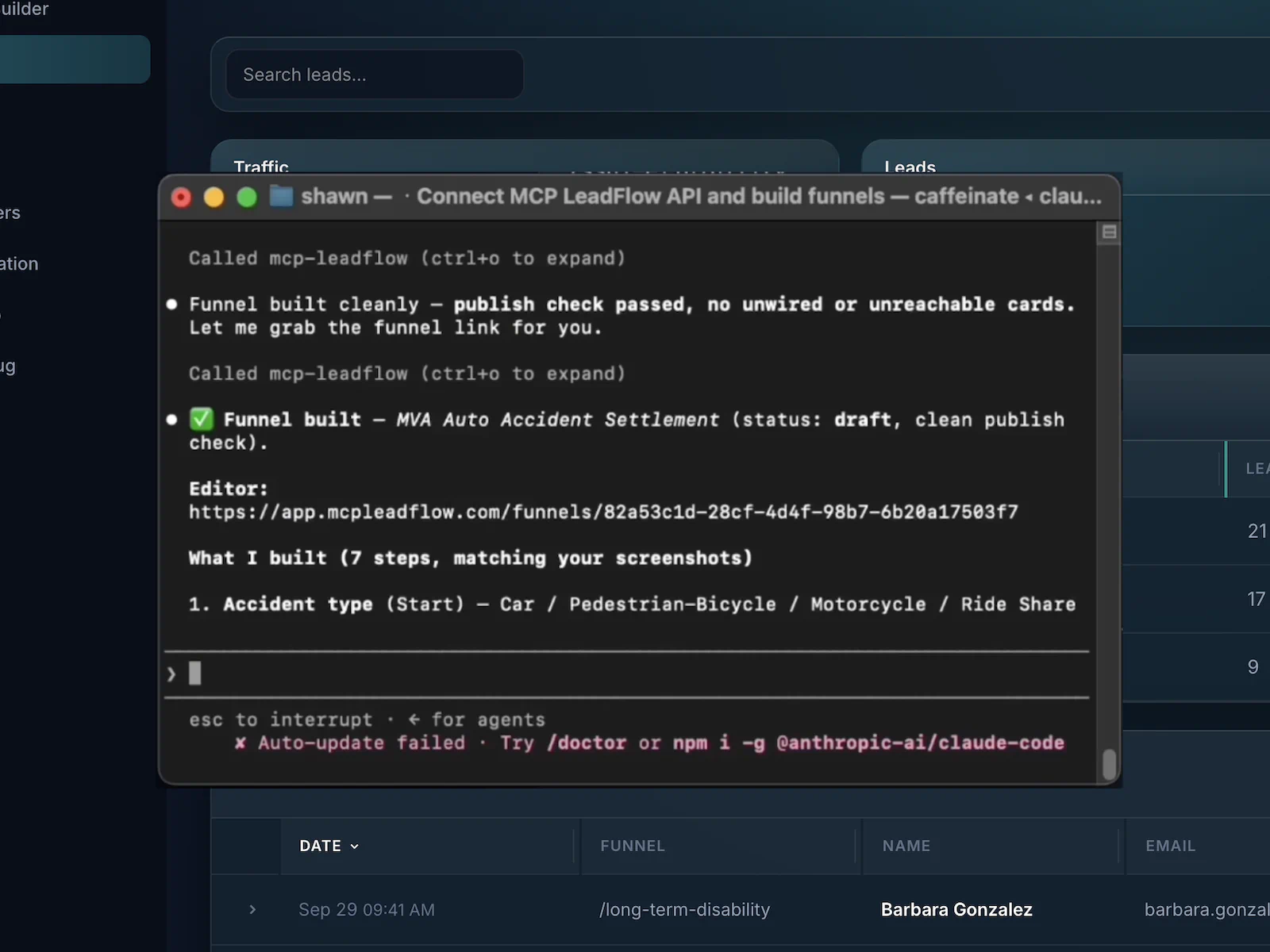
Claude connected to MCP LeadFlow while a funnel is created from a prompt
A real view of funnel creation from Claude over MCP. The diagrams on this page are labeled walkthroughs, not extra screenshots.

Where the finished funnel goes

  • PublishYou publish from the workspace, or you ask the agent to publish, after the draft looks right.
  • EmbedMCP LeadFlow gives you a snippet for your site. This page does not show a live embed code.
  • Hosted linkShare the funnel URL when you do not want to place a snippet on a page.

See How AI Turns Instructions Into Funnels

Pick a brief, then click through the sample. Medicare, an active roof leak, and a business under six months old each open a step the other answers skip. Answers stay in your browser for this visit only.

Instruction

Build an insurance quote funnel with questions for coverage type, household size, and ZIP code.

The agent drafts those three questions, then contact details. A Medicare answer can open one extra enrollment question; other coverage types skip it.

Generated steps

  1. 1
    What type of coverage are you looking for?
  2. 2
    Are you already enrolled in Medicare?Only if coverage is Medicare
  3. 3
    How many people need coverage?
  4. 4
    What is your ZIP code?
  5. 5
    Contact details are the last step

Simulated walkthrough · no AI call · nothing is saved

Step 1

What type of coverage are you looking for?

Choose an answer to follow that branch

Change Your Funnel by Telling AI What to Do

After the first draft exists, you do not have to recreate it to test a new qualifying question. Tell the agent where the new question goes. Marketers who swap filters between offers use this instead of rebuilding the whole flow.

Follow-up instruction

Add a question about current health insurance before asking for the ZIP code.

Highlighting the original four-step flow.

Before

  1. Coverage type
  2. Household size
  3. ZIP code
  4. Contact details

After

  1. Coverage type
  2. Household size
  3. Current insuranceAdded by the instruction
  4. ZIP code
  5. Contact details

The same kind of instruction can remove a step, change an answer, or move contact details to the end. This diagram is a walkthrough of that edit, not a recording from a customer account.

AI-Powered Tools for Building Lead Generation Funnels

The useful part is creation and revision by instruction. Forms, embeds, and analytics are how you ship and read the result.

AI-generated funnel structures

One instruction can produce the question sequence, the answer options, and the path a visitor takes.

Natural-language editing

A later instruction can add, remove, reorder, or reword steps without rebuilding the funnel by hand.

Conditional question logic

An answer can open another question, skip ahead, or send someone who is not a fit to a disqualified ending.

Multi-step lead capture

Visitors move through short qualifying questions, then contact fields, instead of one long form.

MCP connection to your AI client

MCP is how Claude, Cursor, or another compatible client talks to MCP LeadFlow. You set that connection up once.

Preview before publish

Review the draft in the visual builder. A connected agent can also walk sample answers through the draft before you publish.

Website embedding

Publish, then place the embed on your site or send people to the hosted funnel link.

Performance you can act on

Drop-off, lead submissions, and conversion tracking stay in the product so you know what to ask the agent to change.

Reusable funnel setups

Duplicate a funnel or save a workspace template, then start the next offer from that pattern.

AI Funnel Builder vs. Traditional Funnel Builders

An AI-assisted workflow can remove repeated clicking. It adds a setup step: a compatible AI client, connected to MCP LeadFlow, before the first prompt does anything.

Workflow differences between manual funnel setup and MCP LeadFlow with a connected agent
WorkflowTypical manual builderMCP LeadFlow with a connected agent
Initial funnel creationStart from a blank form and add each screen yourself.Describe the funnel to a connected client. The agent creates the draft in MCP LeadFlow.
Question configurationType every label and answer option.The agent drafts the questions and options from your instruction. You review them.
Conditional logicOpen rule settings and attach each branch.Say which answer should show, skip, or disqualify. The agent wires that path.
Updating a live funnelFind the step and edit the fields again.Give a follow-up instruction, such as adding a question or moving contact details last.
Repeating the setupClick through a similar form for every offer.Duplicate a funnel or start from a workspace template, then change the brief.
AI clientNot required. The work is manual configuration.Required for natural-language create and edit. You connect a client you already use. The visual builder remains available for review.

This is a difference in how the work is done. It is not a promise that every funnel is faster, cheaper, or higher converting, and it is not a claim that other products have no AI features.

Create AI-Powered Funnels for Your Industry

Example briefs you can give a connected agent. These are not templates you can open, and this site does not have separate industry template pages. Insurance, roofing, and financing can be clicked through in the walkthrough above.

Insurance lead generation

Build an insurance quote funnel with questions for coverage type, household size, and ZIP code.

Draft structure. Coverage type, a Medicare follow-up when needed, household size, ZIP, then contact details.

Use. Quote requests you can route to an agent or a buyer.

Open this brief in the walkthrough

Debt settlement

Create a debt qualification funnel. Ask for estimated unsecured debt and whether payments are behind. If the debt is under $10,000, end on a disqualified step instead of asking for contact details.

Draft structure. Debt range, payment status, then either contact details or a disqualified ending.

Use. Consult requests that skip people outside the offer’s range.

Illustrative brief only.

Mortgage leads

Build a mortgage lead funnel. Ask whether this is a purchase or a refinance, then credit range and timeline. Skip purchase-price questions on the refinance path.

Draft structure. Purchase or refinance, credit range, purchase price only for buyers, timeline, then contact details.

Use. Inquiries a lender or broker can tell apart before a call.

Illustrative brief only.

Roofing and home services

Create a roofing lead generation funnel that qualifies homeowners based on the type of repair and property location.

Draft structure. Repair type, an urgency question for active leaks, property type, ZIP, then contact details.

Use. Quote requests that separate emergency work from scheduled jobs.

Open this brief in the walkthrough

Real estate

Build a real estate inquiry funnel. Ask if the visitor is buying or selling, then budget or property details, preferred area, and timeline.

Draft structure. Buying or selling, budget or property details, area, timeline, then contact details.

Use. Appointment requests that do not treat buyers and sellers as the same lead.

Illustrative brief only.

Business financing

Build a business loan qualification funnel that asks about monthly revenue, time in business, and requested funding.

Draft structure. Monthly revenue, time in business, a note for very new businesses, funding amount, then contact details.

Use. Applications a funding partner can filter before review.

Open this brief in the walkthrough

Use Funnel Data to Guide Your Next Changes

The loop is build, deploy, measure, review, then edit. Measurement stays in MCP LeadFlow. The agent’s job in this loop is the edit you ask for, not an automatic rewrite.

  1. BuildThe agent creates the funnel from your instruction.
  2. DeployYou publish, then embed it or share the hosted link.
  3. MeasureMCP LeadFlow records drop-off, submissions, and conversions.
  4. ReviewYou read those results in the product and decide what to change.
  5. EditYou tell the agent what to add, remove, or reorder.

What the product tracks

  • Drop-offWhere people leave the funnel.
  • Lead submissionsLeads that were submitted.
  • ConversionsConversion tracking for the funnel.

Labels only. This is not a live dashboard and it is not customer data.

An edit you can ask for after you review the numbers

People are leaving before the ZIP question. Remove the household-size step and ask for location sooner.

You decide that from the analytics in the product, then the agent changes the funnel. Asking an agent to “review step completion and raise conversions” is not an autonomous optimizer, and not every MCP connection exposes an analytics query.

Built for Marketers Who Need to Launch and Improve Funnels

MCP LeadFlow is for marketers who want an agent to do the repetitive configuration. Plans start at $49.99 a month after the trial. Every tier includes the same builder, connection, embeds, and analytics. Higher tiers cover more impressions. See pricing.

Lead generation companies

Describe a buyer’s filters and get a qualification draft you can review, embed, and revise when the spec changes.

Affiliate marketers

When an offer’s rules change, tell the agent which question to add or which answer should disqualify, instead of rebuilding the form.

Performance marketing agencies

Turn a client brief into a draft funnel, preview it, and hand off an embed without a custom build.

Insurance marketers

Ask for coverage, household, and Medicare-style branches in one instruction, then adjust the wording after you see the draft.

Home services advertisers

Generate repair, urgency, and location questions for quote traffic, then move or remove a step with a follow-up prompt.

Teams running more than one funnel

Keep several funnels in one workspace. Duplicate one or save a template when the next campaign is a variation, not a new invention.

AI Funnel Builder FAQs

Short answers based on how MCP LeadFlow works today.

It is software that can create a lead funnel from instructions, not only from fields you add by hand. In MCP LeadFlow you describe the flow to a connected AI agent. The agent creates the questions, answers, and paths in your workspace. You review the draft before it is published.

Create an MCP LeadFlow account, connect an MCP-compatible client such as Claude or Cursor, and describe the funnel. The agent builds the steps. You preview them, ask for changes in plain language or edit them in the visual builder, and publish when you want the funnel live.

Yes. A connected agent can build qualifying questions, answer options, conditional paths, contact fields, and a thank-you or disqualified ending. Publishing is a separate step. The agent does not publish the funnel unless you ask it to.

Yes. Add the MCP LeadFlow connection in Claude, then ask Claude to create or change a funnel. Claude is not embedded as a chat box on this website. You use your own Claude account.

There is no ChatGPT button inside MCP LeadFlow. A prompt typed on chatgpt.com does not create a funnel unless that ChatGPT client is connected to MCP LeadFlow as an MCP server. If your ChatGPT app supports MCP, you connect it the same way you connect Claude or Cursor, and you pay ChatGPT separately.

No. You describe the funnel, review it in the visual builder, and publish an embed or a hosted link. You do not write the question logic as code.

Yes. You can say which answer should open another question, skip ahead, or send the visitor to a disqualified ending. Those paths can also be edited in the builder.

Yes. A follow-up instruction can add a question, change answers, reorder steps, or move contact details. The agent updates that funnel. You can still change it by hand.

Yes. After you publish, place the embed on WordPress, Webflow, Squarespace, Wix, Shopify, Framer, or any page that accepts HTML. A hosted link works if you would rather not embed.

A typical builder starts with a blank form and asks you to configure each question and rule. MCP LeadFlow can start from a plain-language instruction and take later edits the same way. You still connect an AI client, and you still review the draft. Other products may offer their own AI features. This page describes MCP LeadFlow’s workflow.

You need your own account with the AI client you connect, such as Claude or Cursor. That subscription is billed by that provider, not by MCP LeadFlow. After signup you connect the client to your MCP LeadFlow workspace. Natural-language building does not work until that connection exists.

MCP LeadFlow tracks drop-off, lead submissions, and conversions in the product. You read those results, then tell the agent what to change. The agent does not rewrite a live funnel on its own, and this page does not promise that every AI client can query analytics directly.

Build Your Next Lead Generation Funnel With AI

Describe what you need, generate the funnel through your connected AI agent, and change it with a follow-up instruction when the offer changes.

14-day free trial · Card required · Then $49.99/mo · Cancel anytime