
AI-Powered Creation
Describe your funnel and let your connected AI agent build it.
AI-powered funnel builder
Tell your AI what you want. MCP LeadFlow builds the questions, branching logic, and lead capture flow for you.
14-day free trial
Interactive demo
Describe the funnel you need, and your connected AI agent builds it using MCP LeadFlow. Here's an example instruction and the working funnel it produces. Try it yourself to see the questions and conditional logic in action.
02 — The result
Select an answer and click Next to explore the funnel. Your responses won't be submitted.
Explore Health Insurance Options
Sample lead funnel · nothing is submitted
Do you currently have health insurance?
Describe what you need, let AI build it, customize the result, and publish.
Tell your connected AI agent what funnel you want.
AI creates the questions, answers, and conditional logic.
Preview your funnel and make changes using AI.
Embed your funnel on your website and track performance.
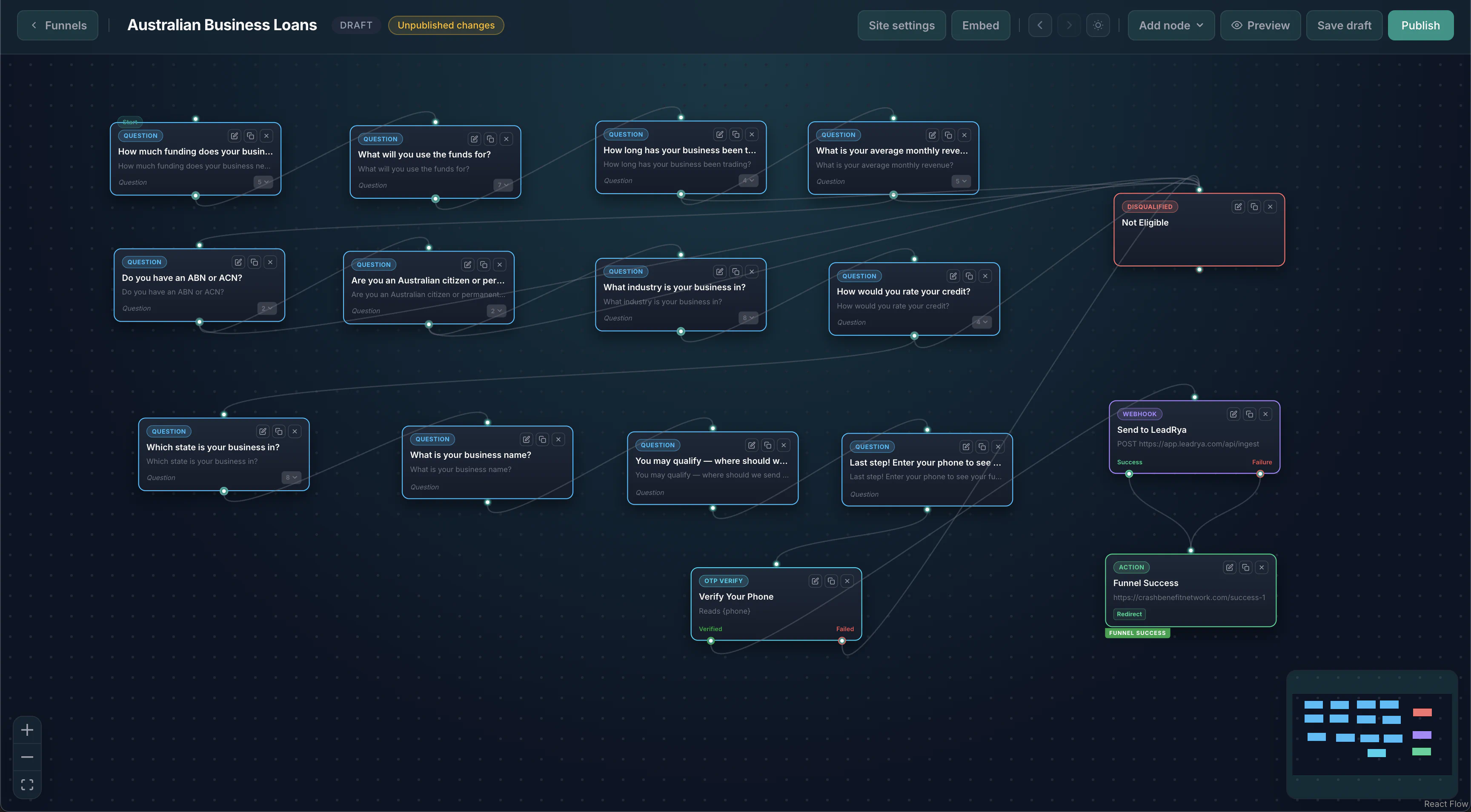
Create, customize, publish, and optimize your lead generation funnels—all in one place.
Describe your funnel and let your connected AI agent build it.
Collect lead information through a sequence of questions.
Show relevant questions based on previous answers.
Modify questions, answers, and funnel structure.
Add your published funnel to an existing website.
Track submissions and understand funnel performance.
Example qualification structures you can describe to your AI agent. These are illustrative patterns—not a published template library yet.
Qualify coverage type, household, and location before contact.
Example questions
Branching: Medicare vs individual paths ask different follow-ups.
Outcome: Higher-intent quote requests for agents or marketplaces.
Screen purchase vs refinance and basic eligibility.
Example questions
Branching: Refinance skips purchase-price questions.
Outcome: Pre-qualified inquiries for lenders or brokers.
Capture buyer/seller intent and market preferences.
Example questions
Branching: Sellers get property-condition questions; buyers get must-haves.
Outcome: Appointment-ready leads for agents.
Scope the job before dispatch or partner routing.
Example questions
Branching: Emergency vs scheduled work changes urgency copy and CTAs.
Outcome: Bookable quote requests for contractors.
Qualify debt load and hardship before a consult.
Example questions
Branching: Below-threshold debt can exit to education content.
Outcome: Compliant, pre-screened consult requests.
Filter revenue, use of funds, and time in business.
Example questions
Branching: Newer businesses see alternate product messaging.
Outcome: Application-ready leads for funding partners.
If you run paid traffic, affiliate offers, or agency client acquisition, this funnel builder is aimed at your workflow.
Stand up offer-specific qualification flows quickly, then iterate copy and branching from campaign learnings.
Match questions to buyer requirements and swap paths when an offer’s filter rules change.
Productize reusable funnel structures across verticals without rebuilding every step from scratch.
Ship client funnels from a brief, preview in the builder, and hand off embeds without custom engineering.
Model coverage, ZIP, and job-scope questions that mirror how your buyers actually qualify traffic.
Keep complex branching maintainable—prompt changes instead of hunting through a brittle form tree.
Same features on every tier. Unlimited funnels, leads, websites, and team members. Silver and Gold scale with impressions. Everyone starts on Bronze with a 14-day free trial.
Straight answers based on how MCP LeadFlow works today.
A funnel builder is software for creating multi-step lead capture experiences—questions, answers, branching logic, and a path that qualifies visitors before they submit contact details. MCP LeadFlow is a funnel builder you control with AI agents over MCP, plus a visual editor for review and edits.
You connect an MCP-compatible AI client (such as Claude Desktop or Cursor), describe the funnel in plain language, and the agent uses MCP LeadFlow tools to create steps, options, and routing. You then preview, tweak in the editor or by prompting again, and publish.
Yes. Describe the funnel to your AI, review it in the visual builder, and publish. You can edit by prompting or by clicking—no code required.
Yes. Paste the embed snippet on WordPress, Webflow, Squarespace, Wix, Shopify, Framer, or any page that accepts HTML. Hosted links work too if you prefer not to embed.
Yes. You can set branching so later questions depend on earlier answers—coverage type, household size, ZIP, intent, and similar qualification paths.
Yes. MCP LeadFlow is built to work with MCP-compatible clients, including Claude. Connect the MCP server in your client, then ask it to build or change funnels.
Yes. MCP LeadFlow includes analytics and tracking so you can see how visitors move through steps and where they convert or drop off.
Insurance, mortgage, real estate, home services, debt, business financing, and other qualification flows. Chat-style, survey, and standard multi-step pages are supported.
Most form builders are drag-and-drop only. MCP LeadFlow is built so AI agents create and revise the funnel over MCP, while you still get a visual builder, embed, branching, and analytics for live lead generation.
Connecting an MCP-compatible client is how you generate and revise funnels with natural language. You can still review and edit in the product UI after a funnel exists. Setup is: sign up, connect your MCP client, then prompt.
Connect your AI agent, describe the qualification flow, and ship an embeddable funnel without configuring every step by hand.
14-day free trial