
What Is a Sales Funnel?
A sales funnel is the series of interactions that turns a potential customer into a buyer. The name comes from the shape: more people enter than finish. That drop is normal. It is not a target.
Marketers often label the stages awareness, interest, consideration, conversion, and retention. Those words describe attention. A working funnel is easier to manage when each stage is an action you can count: an ad click, a page visit, a started questionnaire, a submitted lead, a qualified prospect, a purchase.
- Visitors
- Engaged visitors
- Leads
- Qualified leads
- Customers
Fewer people are left at each stage because some never click, some leave the form, and some are not a fit. The ratios are not the same for every business. This drawing shows the shape, not a benchmark.
Sales funnel, marketing funnel, and lead funnel
A marketing funnel is the broader set of messages that create attention. A sales funnel is the path toward a purchase or a booked job. A lead generation funnel is the part that collects prospects. A lead qualification funnel asks enough to tell a useful prospect from everyone else.
A roofing company makes the difference obvious. The marketing funnel is the ad and the page that explain roof repair. The lead funnel asks whether it is a leak, a replacement, or an inspection, then collects a way to call back. The sales funnel includes the phone call, the quote, and the signed job. Software can build the page and the questions. It does not climb the roof.
An online store often skips the lead form and sends people through a product page, a cart, and checkout, sometimes with an upsell. An insurance lead seller may never talk to the household: the conversion is a qualified lead posted to a buyer. Do not copy a checkout funnel onto a business that sells by phone, or a phone script onto a store.
Step 1: Identify Your Ideal Customer and Offer
Funnel design starts with who the page is for and what you want them to do. If that is fuzzy, every later screen gets worse. “Homeowners” is a crowd. “Homeowners who need a roof repaired” is an audience. “Request a roofing estimate” is an offer. “A qualified inquiry the office can call” is the conversion.
- Audience. Homeowners with a roof problem, not every visitor who likes the logo.
- Problem. A leak, storm damage, or a roof that is due for replacement.
- Offer. A local estimate, not a coupon for unrelated work.
- Value. They find out what the job involves before a salesperson arrives cold.
- Next action. Answer a few questions and leave a way to be reached.
Write those five lines before you open a page builder. The headline, the questions, and the ad all have to agree with them. If the offer is an estimate, the button should not say “Learn more.”
Step 2: Map Your Sales Funnel Stages
Map the actions before you design pages. For the roofer, one honest path is: Google Ad, roofing landing page, qualification questions, contact submission, contractor follow-up.
- Google AdSomeone searches for roof repair.
- Landing pageThe page repeats that offer.
- QuestionsJob type, property, timing, ZIP.
- ContactName, email, and phone.
- HandoffThe office receives the answers.
- ConversionA quote, then a signed job.
The ad’s job is the click. The page’s job is to make the offer obvious. The questions exist so the person who calls already knows the job. The contact step is how the lead leaves the page. The quote happens in the truck or on the phone, not inside the form.
Some businesses need a longer path. A commercial roof can add a question about the building. A store can replace the questionnaire with a product page and checkout. A longer funnel is justified when each extra step changes the next action. It is not justified because a template had eight boxes.
Step 3: Build a Landing Page That Explains Your Offer
The landing page is where the click arrives. It should say what is being offered, who it is for, and the single next step. A useful page has a clear headline, a short explanation, a few reasons to continue, something that makes the business credible, a call to action, and a layout that still works on a phone. Menus and a second offer compete with that step.
For the roofer, a headline that does the job is “Need Roof Repairs? Request a Local Roofing Estimate.” The reader knows the problem, the offer, and that the next click starts the estimate. “Welcome to Summit Roofing, your trusted partner” does not.
Illustrative page · not a real contractor
Need Roof Repairs? Request a Local Roofing Estimate
Tell us the job, the property, and when you need it. A person follows up. This sample is not a quote.
- Repair, replacement, or inspection
- Residential or commercial
- A time window and a ZIP code
Trust on a real page is your license, your service area, or a plain explanation of what happens after submit. Do not invent reviews.
Start the estimate
MCP LeadFlow’s hosted page is this kind of screen: a headline, supporting text, and the questions, on a link you can share or an embed on a site you already have. It is not a drag-and-drop canvas for a whole website. The product page for that hosted screen is the landing page builder.
Step 4: Build Your Lead Capture and Qualification Funnel
A name and email tell you someone is interested. They do not tell a roofer whether water is coming through the ceiling. Qualification is a short sequence of questions whose answers change the next step: what to ask, who to call, or whether to call at all.
A practical roofing sequence:
- What roofing service do you need? Roof repair, roof replacement, roof inspection, or other.
- Is the property residential or commercial?
- When do you need the work completed? As soon as possible, within 30 days, within 3 months, or just researching.
- What is your ZIP code?
- Contact information. Name, email, and phone, after the job is clear.
Order matters. The service question comes first because a leak and a planned replacement are different jobs. Asking for a phone number before the person knows why you need it adds friction. ZIP belongs before the handoff so the office can see whether the address is in range. Put contact details at the end unless you have a reason to ask sooner.
One branch, not a maze
If the visitor chooses roof repair, ask whether water is coming in now. Replacement and inspection do not need that question. That is conditional logic: one answer opens a step, the others skip it. A quiz-shaped version of the same idea is the quiz funnel builder. The form itself, when the page’s job is collecting the lead, is the lead capture page.
What roofing service do you need?
Keep the first version short. You can test a different order later. Privacy belongs on the page in plain language: what you will do with the phone number, and a link to the policy. The confirmation after submit should say that a person will follow up. It should not pretend a quote was already calculated.
Demonstration · roofing inquiry · nothing is saved
Question 1 of 6
What roofing service do you need?
Repair opens one extra question. The other services skip it. ZIP and contact details are labels, not fields you can type into.
When you are ready to build this kind of questionnaire, the product page is the funnel builder.
Build a Lead Generation Funnel With MCP LeadFlowStep 5: Plan What Happens After a Lead Submits
A submitted form is not a sale. Someone has to receive the answers, know what they mean, and do the next piece of work. The prospect should see a confirmation that matches what they asked for.
- Roofing. A representative calls about the job type, the timing, and the ZIP. The quote is that conversation.
- Insurance. A licensed agent follows up about the coverage inquiry. The form did not bind a policy.
- Business financing. A reviewer looks at amount, revenue, and time in business before an application. The form did not approve a loan.
MCP LeadFlow can store the submission, show a thank-you step or a redirect, and post the lead to another system with a webhook or API. The CRM, the dialer, and the email tool that nurture a list are separate. The product does not schedule the appointment, run the pipeline, or send an email course. If the office still works leads from a spreadsheet, that is a real handoff. Write it down and test it with one fake lead before you buy ads.
Step 6: Drive Relevant Traffic Into Your Sales Funnel
A funnel with no visitors is a document. Common sources are Google search ads, Meta ads, organic search, email you already send, referrals, and buttons on the site you have. None of them is always the cheapest. The useful rule is message match: the promise in the ad is the promise on the page.
A search for roof repair should open a page about roof repair. If that click lands on a homepage about gutters, windows, and financing, the visitor has to figure out whether they are in the right place. Many will not. Use the same words in the ad and the headline when you can.
Add the tracking the channel expects. UTM parameters tell you which campaign produced the visit. Conversion tracking inside the ad account tells you which clicks became leads. Those settings live in the ad platform. A form tool can record that a lead arrived. It cannot, by itself, tell you what the click cost.
Step 7: Measure Your Sales Funnel and Improve It
Read the funnel from the bottom up only after you can see each stage. The counts that matter are landing page visits, funnel starts, step completion, lead submissions, the share of leads that qualify, and, when you have the data, cost per lead, cost per qualified lead, and cost per customer. On a funnel hosted in MCP LeadFlow you can see drop-off, submissions, and conversions for that funnel. Cost numbers usually require the ad account. Customer counts usually require the CRM or the sales team’s records.
| Stage | Count | From the previous stage |
|---|---|---|
| Landing page visitors | 1,000 | Starting point |
| Funnel starts | 300 | 30% of visitors |
| Completed submissions | 180 | 60% of starts |
| Qualified leads | 90 | 50% of submissions |
| Customers | 18 | 20% of qualified leads |
Invented counts so the arithmetic is visible. They are not MCP LeadFlow customer results, and they are not a “good” conversion rate.
In this example, 700 of 1,000 visitors never start. That is the largest gap, so the headline, the offer, or the traffic match is the first place to look. Of the people who start, 120 leave before submitting, so the questions are the next place. Half of the submitted leads do not qualify, which may be the filter working. Eighteen customers from 90 qualified leads is a sales-follow-up number, not a form number.
Tests that are worth running: a clearer headline, an offer that matches the ad, fewer questions, a different order, a branch you do not need, different button wording, the page on a phone, and tighter traffic. None of those changes is guaranteed to raise the rate. Change one thing, read the same stages again, and keep the version that improves the stage you meant to fix.
Example: Building a Roofing Lead Generation Funnel
Put the seven steps into one build. A contractor wants estimate requests from homeowners searching for roof repair.
- Traffic. A search ad for roof repair. The headline of the ad names roof repair, not “home services.”
- Landing page. “Need Roof Repairs? Request a Local Roofing Estimate.” One button starts the questions.
- Questions. Service, then a leak question only for repairs, then residential or commercial, timing, and ZIP.
- Contact. Name, email, and phone after those answers.
- Confirmation. A thank-you step that says the office will call. It does not invent a price.
- Handoff. The submission, including the service and the ZIP, reaches the person who calls. A webhook can post it. A spreadsheet can, too, if that is the real process.
- Numbers. Visits, starts, submissions, qualified leads, and jobs sold. The illustrative table above is the shape of that report, not this contractor’s data.
If you can describe that list to a colleague and they can rebuild it, the funnel is specific enough to launch. If you cannot, the offer or the handoff is still vague.
How to Build a Sales Funnel With AI
AI is optional. It is useful for drafting the structure, the questions, a branch, a shorter sequence, and the landing page line. A draft is not a published funnel. You still connect a client, read the steps, and publish when you mean to.
MCP LeadFlow works with an MCP client you already use, such as Claude or Cursor. This website does not include a chatbot that builds the funnel for an anonymous visitor. After you connect, an instruction like this is enough to draft the roofing flow:
Build a roofing lead generation funnel. Ask what roofing service the visitor needs, whether the property is residential or commercial, when the work is required, the ZIP code, and contact information. Add conditional questions based on their service selection.
What that instruction should produce
- Service: repair, replacement, inspection, or other
- A leak question only on repair
- Residential or commercial
- Timing
- ZIP code
- Name, email, and phone
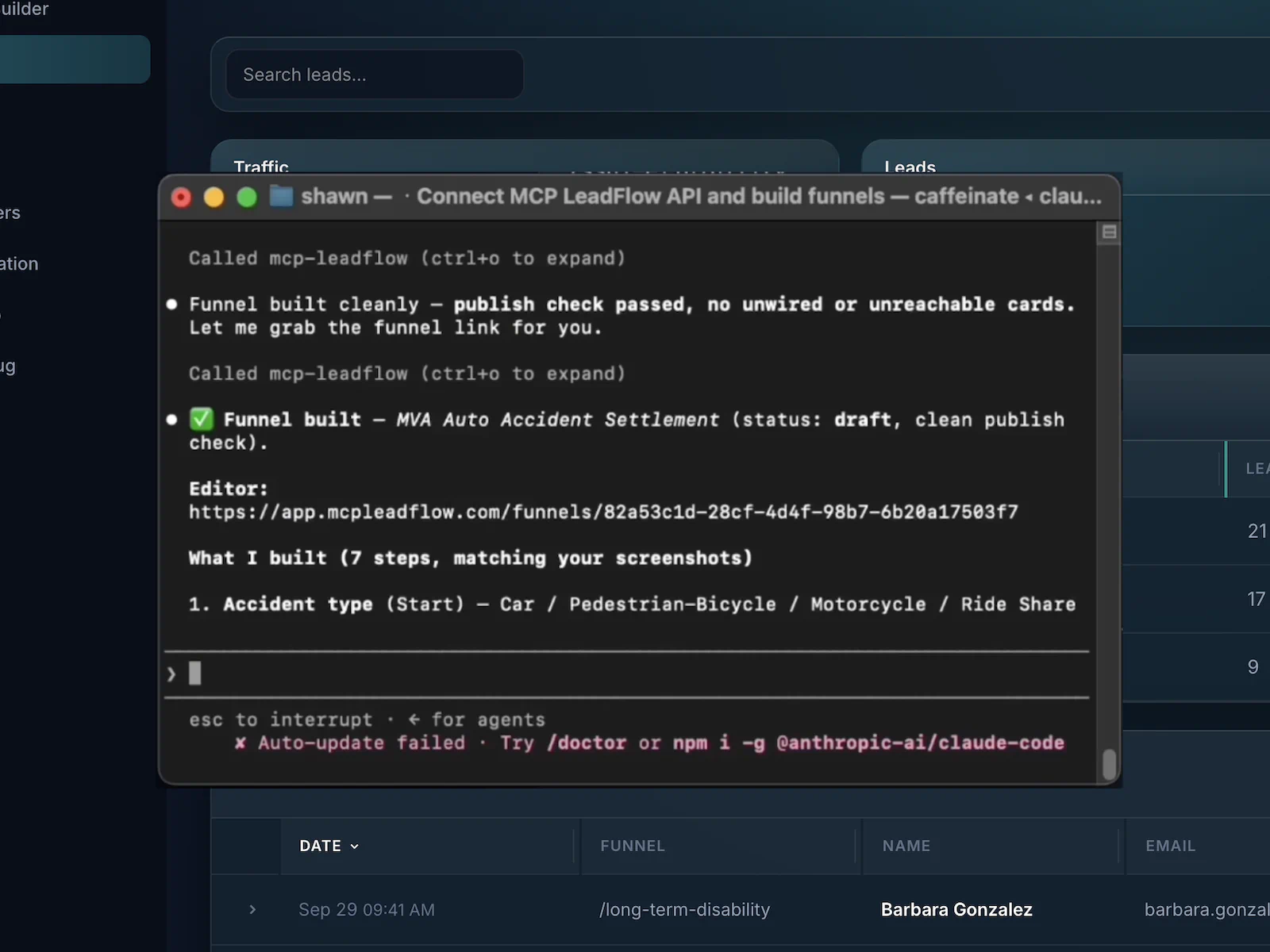
The same client can revise it later: drop a question, move the phone number, or send a job type to a different thank-you step. That workflow does not buy traffic, charge a card, or run the sales pipeline. Checkout, one-click upsells, and email sequences are other products. The page that explains the AI connection is the AI funnel builder.
Common Mistakes to Avoid When Building a Sales Funnel
- The wrong audience. A roof-repair ad shown to people shopping for interior paint produces cheap clicks and useless leads. Fix the targeting before you rewrite the form.
- An unclear offer. “Contact us” can mean a job, a brochure, or a complaint. Name the estimate, the quote, or the call.
- Too many questions, too early. Ten fields before the person knows the offer is why starts do not become submissions. Ask what changes the next action.
- The wrong page. Search traffic for an emergency leak should not land on a general remodeling gallery.
- No follow-up plan. Leads that sit in an inbox until Monday are not a sales process. Decide who calls and how fast, then test it.
- No stage counts. A total lead number hides whether people quit on the page, the form, or the phone.
- Volume over fit. More leads at a lower quality can raise the cost of a real job. Count qualified leads, not only submissions.
- A complicated first version. Branches, upsells, and three traffic channels at once make it impossible to see what failed. Ship the roofing path above, then add a step when a real lead shows you need it.
Sales Funnel Launch Checklist
Use this before you send traffic. The checks stay in this browser tab. Copy them if you want the list in a doc.
0 of 13 checked · saved only in this browser tab
Frequently Asked Questions About Building Sales Funnels
What is a sales funnel?
A sales funnel is the path a potential customer takes from first finding you to buying, booking, or otherwise converting. The stages are the actions you can see: a visit, a lead, a qualified prospect, a conversation, a purchase. It is a planning model, not a guarantee that every visitor moves through the same screens.
How do you build a sales funnel from scratch?
Name the customer and the offer, map the steps from the first visit to the conversion, build the page they land on, add the questions or form that capture and qualify them, decide who follows up, send traffic that matches the offer, and measure where people leave.
What are the main stages of a sales funnel?
People often use awareness, interest, consideration, conversion, and retention. In a lead-generation business the measurable version is closer to visitors, engaged visitors, leads, qualified leads, and customers. A store may replace the lead steps with a product page and checkout.
How many steps should a sales funnel have?
Enough to learn whether the person fits, and no more. A newsletter can be one field. A roofing estimate usually needs the job type, the property, the timing, a location, and a way to call back. Add a question only when the answer changes what happens next.
Can I build a sales funnel without coding?
Yes. You can describe the questions to a connected AI client or edit them in a visual builder, then publish an embed or a hosted link. Buying the traffic, making the sales call, and taking payment are still separate work.
How much does it cost to build a sales funnel?
The software is only part of the cost. MCP LeadFlow’s published plan is $49.99 a month after a 14-day trial, and a card is required to start. Ads, a website you already have, and the time your team spends on follow-up are extra and vary by business. See pricing.
Can AI create a sales funnel?
A connected AI client can draft the questions, the branches, and the page copy from a description. You still review it. AI does not buy the ads, call the prospect, or run a checkout unless you connect other tools that do those jobs.
What is the difference between a sales funnel and a lead generation funnel?
A lead generation funnel collects and qualifies prospects. A sales funnel is the wider path, including the conversation and the purchase. The lead funnel is the middle of many sales funnels, not the whole thing.
Do I need a landing page for my sales funnel?
You need a place the click lands that matches the offer. That can be a page on your site or a hosted page whose only job is the next step. Sending a roof-repair ad to a homepage full of other services usually wastes the click.
How do I know whether my funnel is working?
Compare the counts at each stage: visits, starts, submissions, qualified leads, and customers. The stage that loses the most people is the first place to edit. Some of those counts live in the ad account or the CRM, not in the form tool.
What is a good sales funnel conversion rate?
There is no universal rate. A good rate depends on the industry, the traffic source, the offer, and whether you are counting a click, a lead, a qualified lead, or a paying customer. Use your own stages as the baseline, then improve the weakest one.
What tools do I need to build a sales funnel?
You need a page, a way to capture or qualify the lead, a way to tell the sales team, and a way to see where people drop off. Advertising, email, checkout, and a CRM are separate tools when the business uses them. MCP LeadFlow covers the lead and qualification stages, not the checkout or the CRM.
Start Building Your Sales Funnel
A useful funnel starts with a clear offer and a conversion you can count. Map the path, build the page and the questions, decide who follows up, send traffic that matches the message, and read the stages. MCP LeadFlow can draft and host the lead generation and qualification steps with a connected AI client. The call, the quote, and the payment stay in the systems you already use for those jobs.